


March 31, 2017
This release allows you to set controlled vocabulary for batch fields using pick lists.
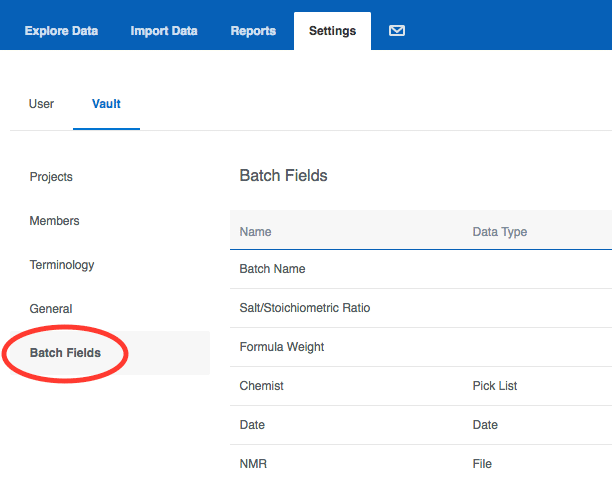
Batch Fields (formerly known as Registration Rules) Batch fields used to be called registration rules, and you can find them in the same place under your Vault settings:
 We introduced pick lists for readouts (protocol data) in the
last release, and now they are available for batch fields as well. The new pick list data type allows vault administrators to define data dictionaries and control the vocabulary of permissible values for individual batch fields.
We introduced pick lists for readouts (protocol data) in the
last release, and now they are available for batch fields as well. The new pick list data type allows vault administrators to define data dictionaries and control the vocabulary of permissible values for individual batch fields.
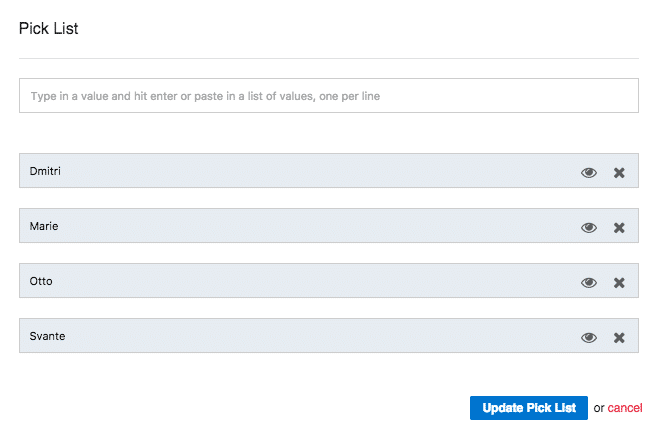
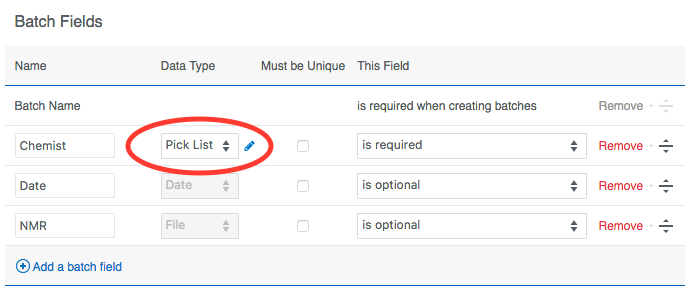 Clicking the pencil icon will bring up the pick list editor. You can enter allowed values individually or paste in a whole list all at once. If you want to retire or decommission a value without removing it from existing batches, you can click the eye icon to "hide" it. Existing data will remain, but that value will no longer be allowed for new batches.
 Migrating Existing Data to Pick Lists You can migrate batch fields by exporting the existing data, creating a new pick list batch field, reimporting into the new pick list batch field, and deleting the old one. For readout (protocol) pick lists we have a migration tool that can convert the data for you. Please contact
support@collaborativedrug.com if you have any questions about migration.
Other Changes
Migrating Existing Data to Pick Lists You can migrate batch fields by exporting the existing data, creating a new pick list batch field, reimporting into the new pick list batch field, and deleting the old one. For readout (protocol) pick lists we have a migration tool that can convert the data for you. Please contact
support@collaborativedrug.com if you have any questions about migration.
Other Changes
We introduced pick lists for readouts (protocol data) in the
last release, and now they are available for batch fields as well. The new pick list data type allows vault administrators to define data dictionaries and control the vocabulary of permissible values for individual batch fields.
Clicking the pencil icon will bring up the pick list editor. You can enter allowed values individually or paste in a whole list all at once. If you want to retire or decommission a value without removing it from existing batches, you can click the eye icon to "hide" it. Existing data will remain, but that value will no longer be allowed for new batches.
Migrating Existing Data to Pick Lists You can migrate batch fields by exporting the existing data, creating a new pick list batch field, reimporting into the new pick list batch field, and deleting the old one. For readout (protocol) pick lists we have a migration tool that can convert the data for you. Please contact
support@collaborativedrug.com if you have any questions about migration.
Other Changes
- A molfile structure representation is now included when retrieving molecules via the API.
- Molecules can now be deleted without first removing the associated data if you have write access to all of the molecule's projects. After you confirm that you really mean it, the molecule and all associated data are deleted.