
January 27, 2026
Registration Updates:
Registration Forms are now available in CDD Vault, giving teams a flexible way to register multiple entity types within a single Vault—each with tailored metadata and unique identifier schemes.
Registration Forms:
- Define custom registration forms for different entity types
- Specify which molecule, batch, and sample/inventory fields appear for each form, ensuring users only see fields relevant to the entity being registered (coming soon)
- Optionally lock forms to prevent future registrations
Registration Systems:
- Assign distinct identifier schemes (prefix + sequential numbering) per entity type
- Support multiple registration systems within a single Vault
- Automatically generate unique, consistent identifiers for all registered entities
Support for Multiple Entity Types:
Registration Forms support the following registration type classifications:
|
Entity |
Registration Type |
|
Small Molecule |
Structure |
|
Macromolecule |
Structure |
|
Antibody Drug Conjugate |
Mixture |
|
Antibody |
Mixture |
|
Nucleotide Sequence |
Nucleotide |
|
Amino Acid Sequence |
Amino Acid |
|
Cell Line |
Other |
Custom Registration Names:
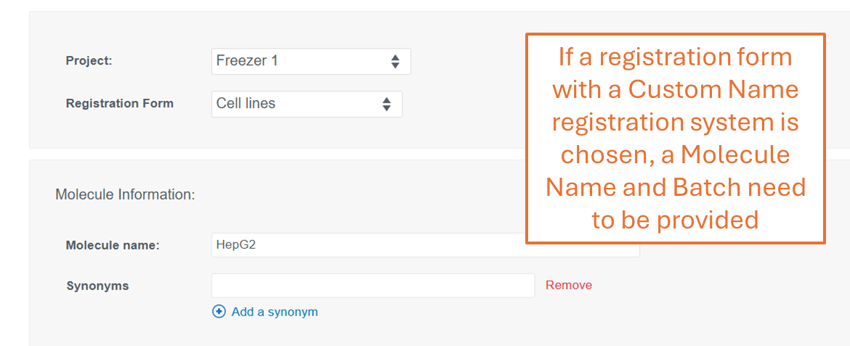
Custom Registration Names now allow users to supply meaningful primary identifiers and batch names when registering entities. These names are prominently displayed throughout CDD Vault. No identifiers will be automatically created. Contact CDD Support to enable this custom feature. 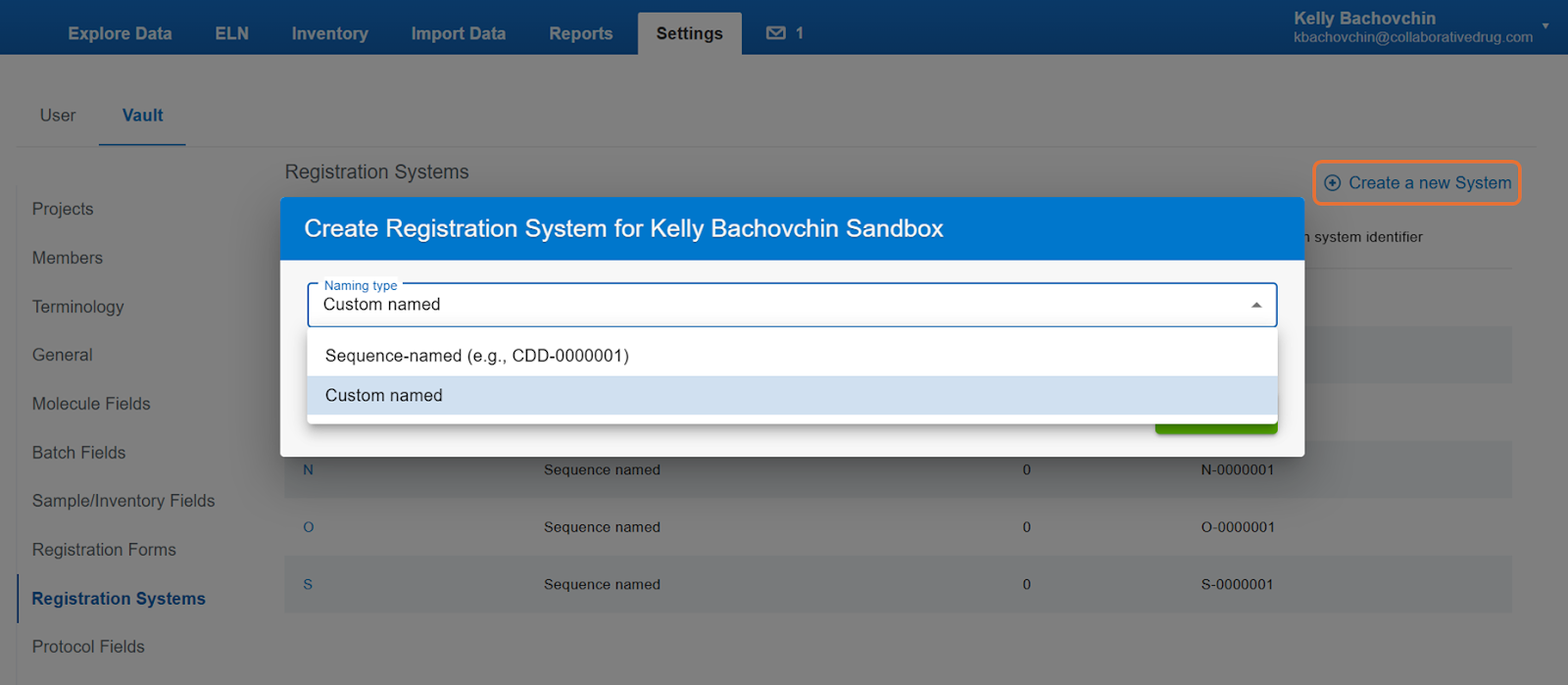
Why It Matters
-
Improved organization: Keep heterogeneous entities clearly categorized within one Vault.
-
Reduced complexity: Eliminate irrelevant fields during registration (coming soon), and utilize a single inventory and ELN within one Vault.
-
Scalable workflows: Add new entity types and registration schemes as research needs evolve.
-
Consistency: Enforce standardized identifiers and metadata capture, and avoid duplicate field creation.
-
Searchability: The same metadata field can be used across forms making it easy to query different entities at once.
How to Get Started
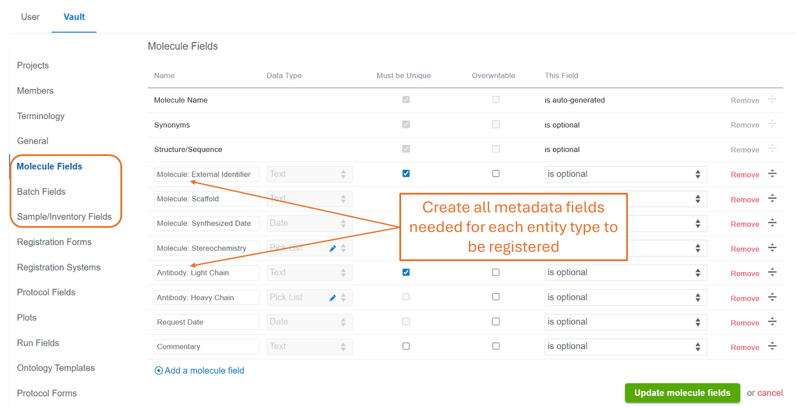
1. Prepare Vault Fields
Before building Registration Forms, create all required:
- Molecule-level fields
- Batch-level fields
- Sample/Inventory-level fields
These are configured under:
- Settings → Vault → Molecule Fields
- Settings → Vault → Batch Fields
- Settings → Vault → Sample Fields
Note: Fields can be marked as required globally or required only within specific Registration Forms (coming soon).
2. Configure Registration Systems
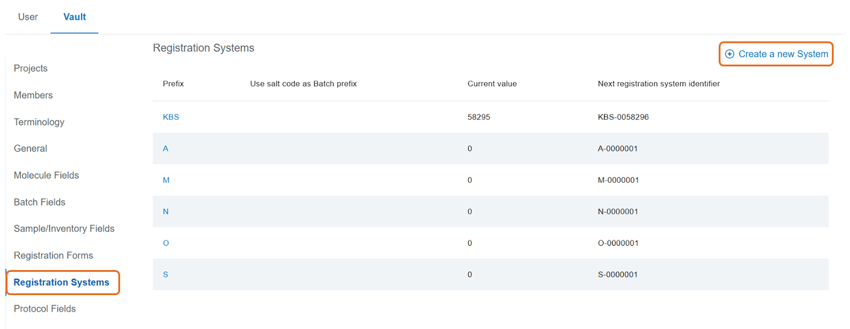
After contacting CDD Support to enable the appropriate number of Registration Systems:
- Navigate to Settings → Vault → Registration Systems
- Create one or more systems by defining:
-
Prefix
-
Current numeric value
-
Optional salt code usage (small molecules only)
-
Each system controls how identifiers are auto-generated, or names can be provided for a custom name registration system.
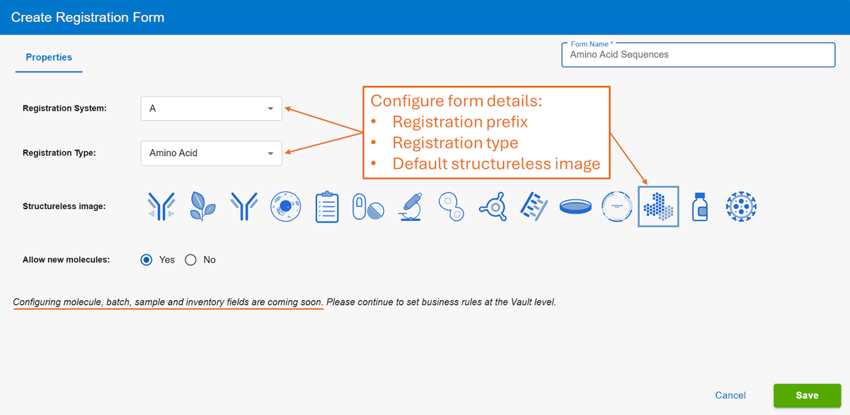
3. Build Registration Forms
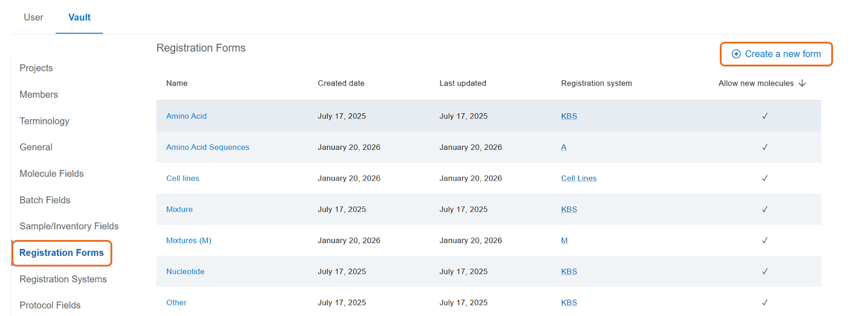
- Navigate to Settings → Vault → Registration Forms
- Create a form for each entity type
- Assign:
- A Registration System
- A Registration Type (Structure, Mixture, etc.)
- Drag and drop relevant fields into the Molecule, Batch, Sample, and Inventory tabs (coming soon)
Once saved, the form becomes available for use immediately.
Registering Entities
- In the UI, users can select a Registration Form directly from the New Entity page.
- During bulk registration via the data importer, the selected Registration Form controls which fields appear in the mapping interface.
- Displayed fields automatically update based on the chosen Registration Form, ensuring a clean and relevant data entry experience.
What’s coming soon
Selecting a subset of fields per registration form will be coming soon. In the meantime, Vault Administrators can create all the necessary fields needed and the forms to be used. Once the custom fields feature is released, Administrators can retroactively adjust their already built forms to reflect the correct metadata fields.
Features coming soon:
- Drag and drop relevant fields into the Molecule, Batch, Sample, and Inventory tabs.
- Displayed fields automatically update based on the chosen Registration Form.
- Set business rules for each field on a per Registration Form basis: required, default value, locked value, allow a subset of pick list values.
To provide feedback on features, or if you have questions and want to schedule a demo, please contact support@collaborativedrug.com.